Efficient workouts
Bible Verse Finder
FAQS
Find answers to common questions below:
1. What is Bible Verse Finder?
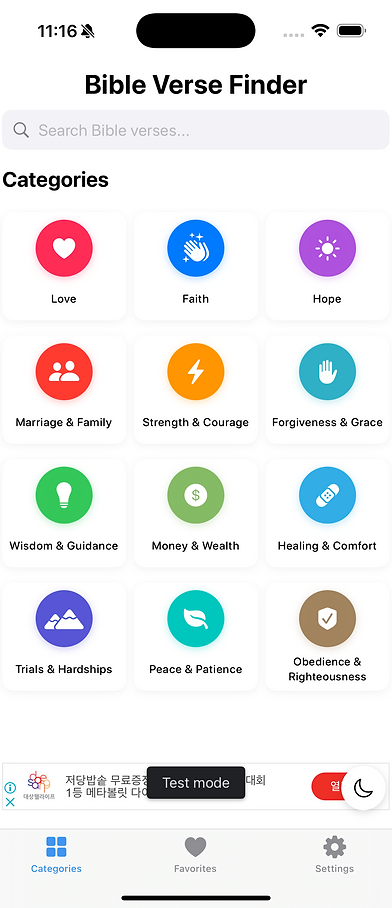
Bible Verse Finder is an iOS app that allows users to search for Bible verses based on categories or specific keywords. The app does not require an internet connection, as all Bible verses are stored locally in a text file (bible.txt).
2. How do I search for a Bible verse?
You can search for a Bible verse in two ways:
-
By Category: Select a category (e.g., Love, Faith, Strength) and the app will find a related Bible verse.
-
By Keyword: Type a word (e.g., "hope") in the search bar, and the app will find a Bible verse that contains that exact word.
3. How does the category search work?
Each category has a predefined set of keywords. When you select a category, the app searches for Bible verses in bible.txt that contain one or more of these keywords.
4. Can I refresh to see another Bible verse?
Yes! If multiple verses match your search, the app will randomly display one of them. Tapping the "Refresh" button will show another random verse from the search results.
5. Can I save my favorite verses?
Yes! You can save Bible verses to your Favorites by tapping the save icon. Your saved verses will be accessible in the Favorites tab.
6. Does the app require an internet connection?
No. All Bible verses are stored locally in bible.txt, so the app works completely offline.
7. Which Bible version is used in this app?
The app uses the World English Bible (WEB), which is in the public domain and easy to read.
8. Can I choose between the Old and New Testament?
Yes! In the app’s settings, you can choose to search for verses in:
-
Old Testament only
-
New Testament only
-
Both Testaments
9. What happens if no verse is found for my search?
If no verse contains your exact keyword, the app will display a message suggesting you try a different word.
10. Does the app track my searches or personal data?
No. Bible Verse Finder does not track your searches, collect personal data, or use analytics. The app is designed for 100% privacy.
11. Are there ads in the app?
Yes, the app uses Google AdMob for ads, but all ads are non-personalized to protect your privacy.
12. How do I switch between Light and Dark Mode?
You can enable Light Mode or Dark Mode in the app’s settings. The app will also follow your system-wide appearance settings by default.
13. Can I copy or share a Bible verse?
Yes! Each verse has a share button, allowing you to copy it to your clipboard or share it via text, social media, or email.
Privacy Policy for Bible Verse Finder
Effective Date: March 14, 2025
Last Updated: March 14, 2025
Bible Verse Finder ("we," "our," or "us") is committed to protecting your privacy. This Privacy Policy explains how we collect, use, and safeguard information when you use our mobile application (the "App"). By using the App, you agree to the terms of this Privacy Policy.
1. Information We Collect
A. Personal Information
We do not collect, store, or share any personally identifiable information such as name, email address, or phone number.
B. Non-Personal Information
The App may collect certain non-personal data automatically, including:
App usage data (e.g., session duration, interactions)
Device information (e.g., device model, operating system version)
Crash reports and performance analytics
This information is used solely to improve the App’s functionality and user experience.
2. How We Use Your Information
The data collected is used for:
Improving the App’s stability and performance
Analyzing usage trends to enhance user experience
Identifying and fixing technical issues
We do not sell or share user data with third parties for advertising or marketing purposes.
3. Third-Party Services
The App may use third-party services that collect data under their own privacy policies. These services may include:
Analytics Services (e.g., Google Analytics, Firebase) to assess and improve performance
Advertising Networks (if applicable) for displaying ads
Users should review the privacy policies of these third-party services for further information on their data handling practices.
4. Data Security
We take reasonable measures to protect user data. However, no system is entirely secure, and we cannot guarantee the absolute security of information transmitted or stored by the App.
5. User Rights and Choices
Users may have the following options regarding data collection:
Opt-Out: If applicable, analytics tracking can be disabled in device settings.
Data Deletion: If the App collects user-generated data, users may request deletion by contacting us.
Access and Updates: Users may request to review or update any stored data, if applicable.
6. Children's Privacy
The App is not intended for children under the age of 13. We do not knowingly collect or store personal data from children. If a parent or guardian believes a child has provided personal data, they should contact us to request its removal.
7. Changes to This Privacy Policy
We reserve the right to update this Privacy Policy at any time. Any changes will be posted within the App or on our website. Continued use of the App after changes are made constitutes acceptance of the updated policy.
8. Contact Information
For any questions or concerns regarding this Privacy Policy, please contact us at:
Email: [info@hitfire.se]
This Privacy Policy is designed to comply with applicable privacy laws and regulations.